Just twelve months ago, creating a photorealistic image of a tuxedo-clad cat required years of digital art training. Today, typing a few words into tools like Google Gemini AI photo prompts produces stunning results in mere seconds. This breakthrough in AI image generation often looks like pure magic, but it is actually a highly sophisticated method of connecting digital dots.
Many people mistakenly believe these programs just search the internet to collage existing pictures together. According to computer scientists, the reality is much closer to a master chef learning to cook. By studying millions of reference pictures—a massive library called "training data"—Gemini memorized the fundamental ingredients of our visual world until it understood the exact essence of floppy ears, wet noses, and completely original artistic styles.
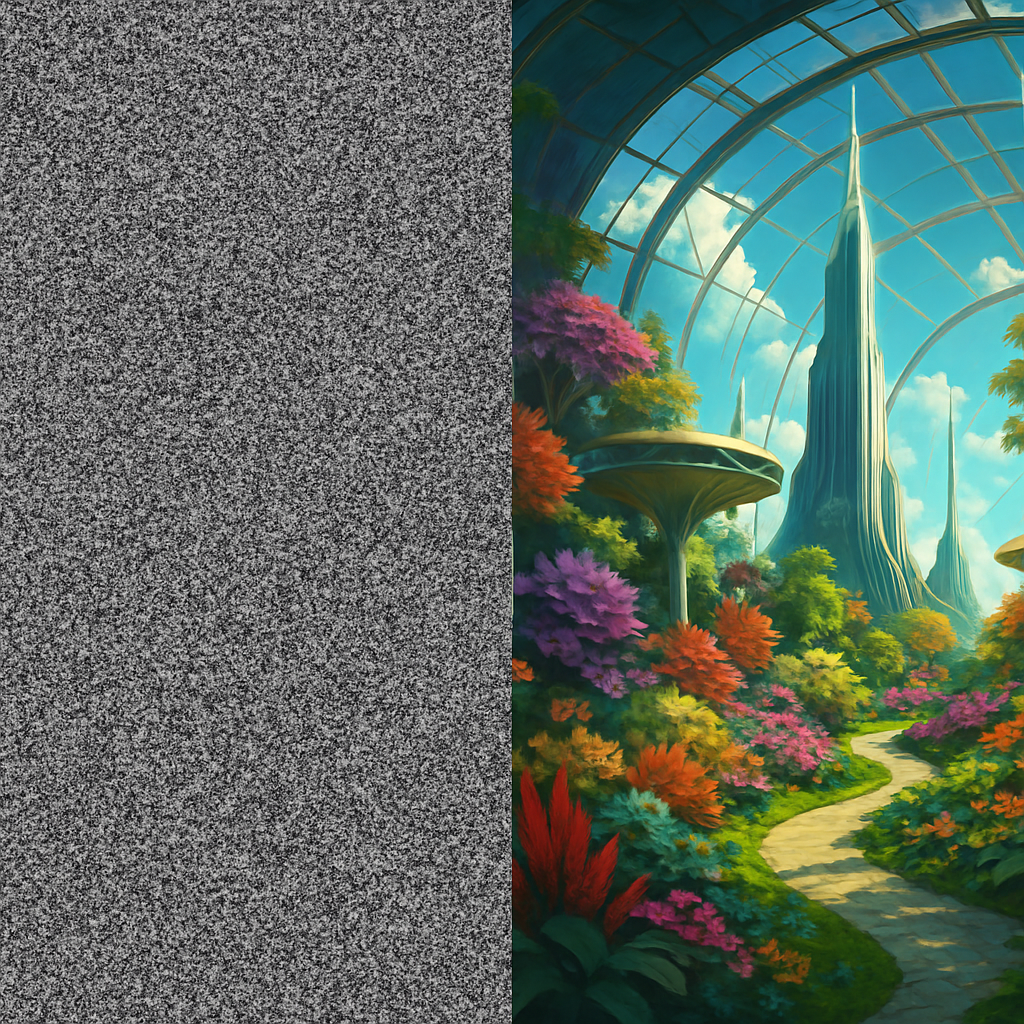
To understand how diffusion models work, imagine a sculptor carefully carving a statue out of a rough block of marble. Gemini starts every request with a digital canvas completely filled with random visual static, known as "noise." Through a step-by-step process called diffusion, the system slowly chisels away any pixels that do not match your written words until a perfectly clear, never-before-seen image finally emerges from the chaos.
How Gemini Turns Your Words into Pixels
You already know that AI learns by studying millions of visual examples, like flipping through endless flashcards. But when you type Gemini image prompts, the system isn't just cutting and pasting those old pictures into a collage. Instead, this text-to-image synthesis relies on a clever method called a latent diffusion architecture.
The AI doesn't start with a blank canvas; it actually begins with a screen full of random visual static. Because the starting static is entirely random every single time, the resulting image will always be completely unique. Guided by the patterns it learned from its training data, the AI slowly clears away the static to reveal the picture hidden inside:
- Noise: The canvas begins as pure, meaningless visual static.
- Shapes: The AI begins recognizing familiar patterns, forming the blurry, general outlines of your request.
- Details: The final static clears away entirely, leaving sharp, finished textures like glossy fur or glowing streetlights.
Watching this transformation unfold feels incredible, but the entire process is strictly directed by the instructions you provide. If you just ask for a "dog," the AI has to guess the breed and setting, leaving too much to chance. To get exactly what you want, you need to know how to properly guide the system.
The 'Taxi Driver' Rule for Precise Prompting
Imagine getting into a taxi and simply saying, "Take me to a building." The driver will certainly take you somewhere, but it will rarely be your actual destination. Writing vague instructions for an AI works the exact same way. If you only type "a cat," the system must guess the breed, the mood, and the background, which often generates generic or confusing pictures. To grab the digital steering wheel, you need a technique called prompt engineering for better results—which simply means choosing precise, descriptive words to guide the AI exactly where you want to go.
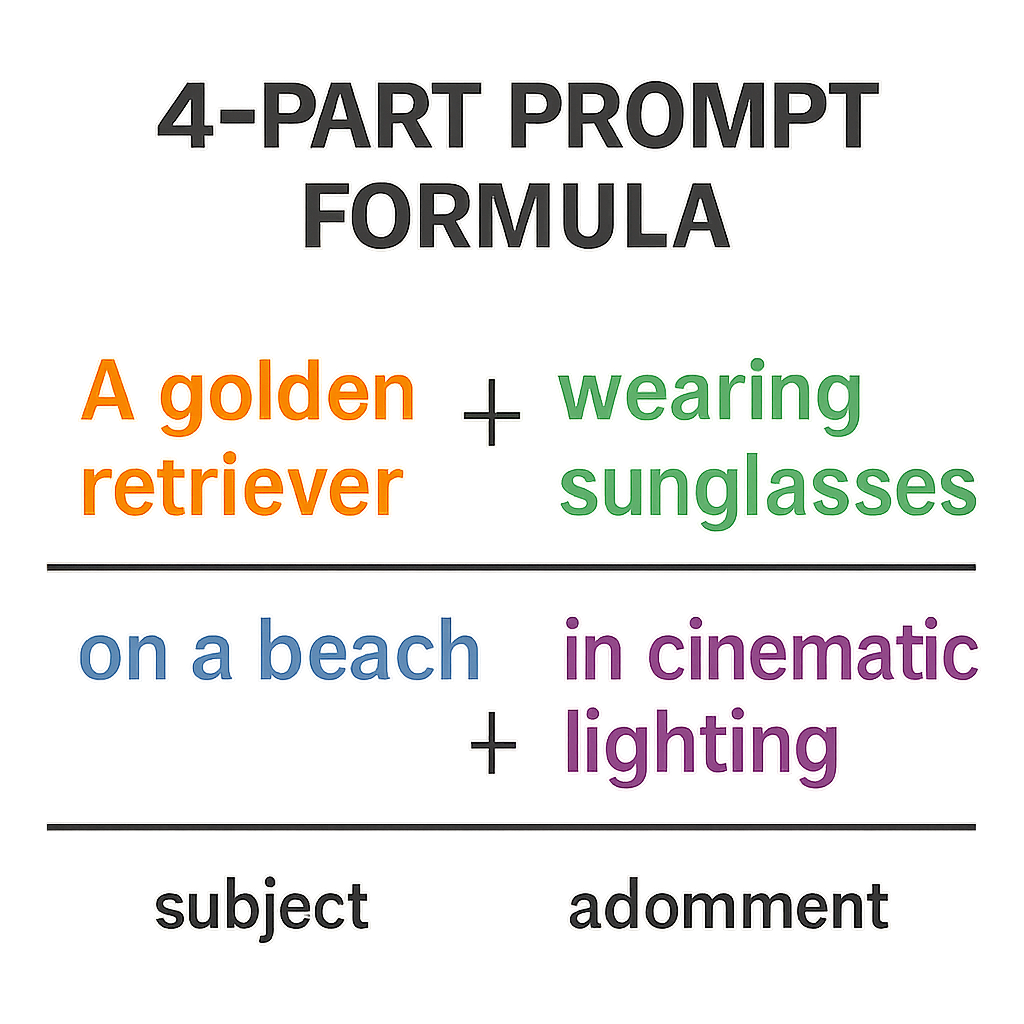
The simplest way to stop the AI from guessing is to follow a reliable recipe. When typing Gemini AI prompts or Gemini AI photo prompts, layering specific adjectives helps build a sharper picture in the system's "mind." Try using the 'Core Four' formula to structure your requests:
- Subject: Who or what is the main focus? (e.g., A golden retriever)
- Action: What are they doing? (e.g., catching a red frisbee)
- Setting: Where does this happen? (e.g., on a sunny beach)
- Style: How should it look? (e.g., cinematic photography)
Mastering this basic structure transforms you from a passive passenger into a creative director. Even when you are looking for the best Gemini AI prompts for photo editing later on, this descriptive foundation ensures the AI understands exactly which parts of your image need changing. You now have a clear subject and action perfectly placed in a setting, but adjusting the atmosphere elevates the final piece. It also applies to AI Gemini photo prompts for new generations and edits.
Setting the Scene: Using Lighting and Style Modifiers
Once your basic recipe is ready, the fun begins by changing the visual medium. You do not need an art history degree to create stunning pictures; you just need to borrow from the system's massive library of concepts. Appending a phrase like "watercolor painting," "charcoal sketch," or "vintage comic book" instantly transforms the entire image. When crafting effective AI art prompts, treating the AI like a versatile painter who can mimic any technique ensures your results feel highly unique rather than generic.
Directing the virtual camera offers another powerful way to control the viewer's experience. Instead of settling for a standard, flat view, tell the system exactly where you want it to stand. Requesting an "extreme close-up" reveals intricate textures on a subject's face, while asking for an "aerial drone shot" captures the vast scale of a city landscape. By specifying these physical perspectives, you force the AI to frame the subject exactly how you picture it in your head.
Atmosphere relies heavily on illumination, turning a basic snapshot into a dramatic scene in seconds. Adding specific lighting keywords completely shifts the emotional tone of your creation. Try "golden hour" for a warm morning glow, "cinematic lighting" for movie-like drama, or "harsh shadows" for a sense of mystery. When you test different photo prompts for Gemini AI, treating light as a physical tool you can control brings a professional polish to everyday subjects.
Blending these artistic, spatial, and lighting choices gives you complete creative command. This precision is incredibly helpful when using Gemini AI photo editing prompts to alter an existing picture, allowing new additions to perfectly match the original mood. Yet, even with flawless instructions, the AI occasionally gets confused by human anatomy or intricate details, resulting in strange, distorted mistakes.
Solving the 'Six-Finger' Problem: Fixing Artifacts and Distortion
Have you ever noticed a stunning AI portrait completely ruined by a hand with six fingers? These strange glitches, known as "artifacts," happen because the AI lacks basic human logic. The system learned the visual pattern of skin and shadows from millions of photos, but it does not actually know that a human hand requires exactly five fingers. To fix distorted faces in generated art or correct bizarre limbs, you must manually compensate for the system's lack of real-world understanding.
The most effective way to regain control is by telling the AI what not to do. Imagine instructing a chef on exactly which ingredients to leave out of your meal. This is precisely how a negative prompt works. If your generated picture features extra arms or a messy background, listing terms like "extra limbs" or "blurry" acts as a strict boundary. Using negative prompts for artifact reduction forces the system to avoid its most common, chaotic mistakes and focus on clean elements.
When testing out new AI photo ideas, you will inevitably encounter these visual hiccups. To quickly get your artwork back on track, follow this checklist for fixing common AI errors:
- Add 'negative' prompts.
- Use 'upscaling.'
- Reroll the prompt with more detail.
Mastering these simple corrections ensures your creations look beautifully intentional rather than accidental. With clean, logical results mastered from scratch, image-to-image translation offers even more control.
Advanced Gemini Tactics: Image-to-Image and Upscaling
Typing words into a prompt box is a great start, but sometimes you already have a visual idea in mind. If you want to convert rough sketches into polished art, you can use image-to-image translation techniques. Instead of starting with a blank canvas, you upload a basic drawing and ask the AI to reimagine it. It is like giving a simple coloring book page to a professional painter; the AI keeps your original shapes but adds stunning lighting and realistic textures.
This visual foundation is incredibly helpful when you want to tell a story across several pictures. Because the system usually creates a completely new face every time you hit generate, creating consistent characters with AI can be a major challenge. By feeding the AI an existing picture of your subject as a reference, you give it a strict visual guide. The AI uses this anchor to ensure your hero looks the same whether they are relaxing at home or exploring a jungle.
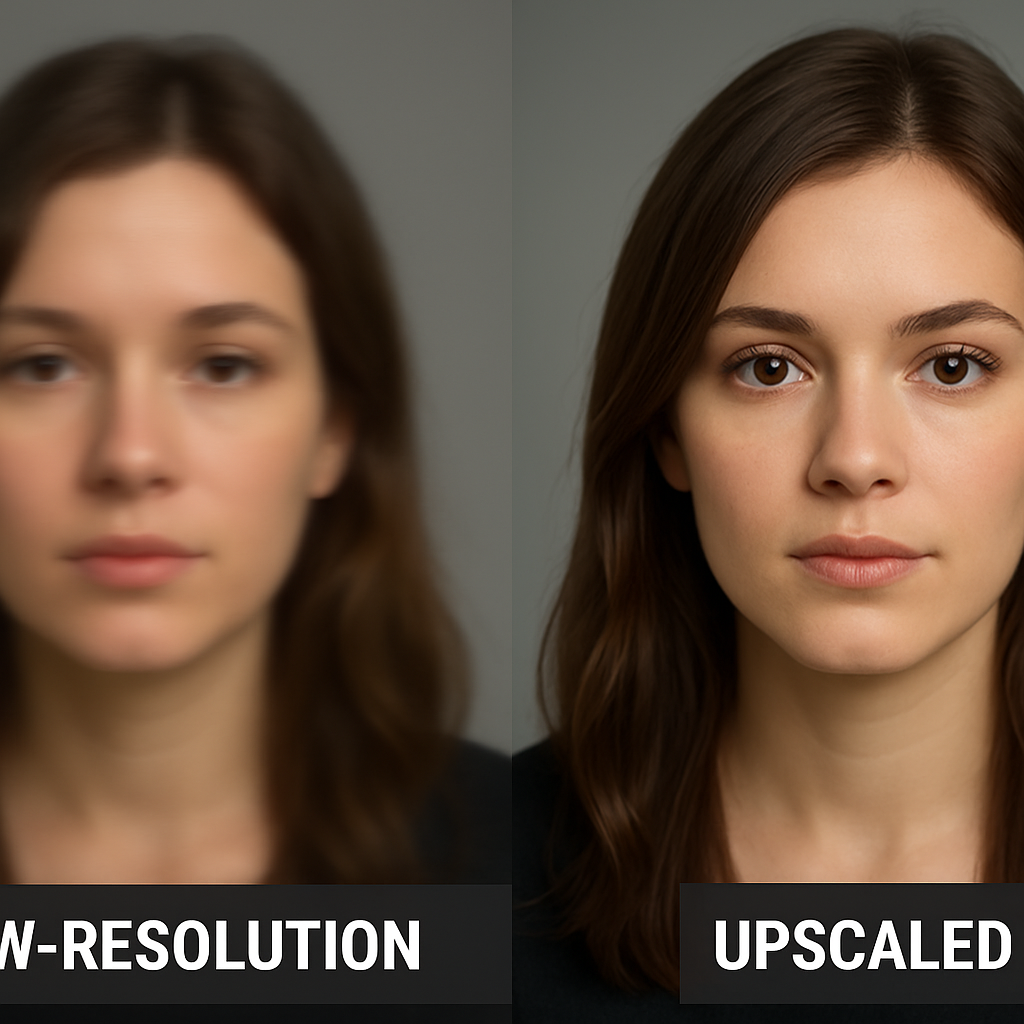
Once your final masterpiece is generated, you might notice the downloaded file looks a bit blurry if you try to print it as a large poster. To prepare images for high-quality printing, you need to apply high-resolution upscaling techniques. Upscaling acts like a digital magnifying glass that intelligently fills in missing pixels, turning a fuzzy picture into a crisp, sharp photograph.
Is Gemini Better? Comparing Midjourney and Stable Diffusion
Now that you know the basics, you are not limited to just one creative assistant. While using Google Gemini AI photo editing prompts provides a simple starting point, the wider AI world features specialized tools for different needs. Think of it like choosing a vehicle: a bicycle is great for a quick ride, but you need a truck for heavy lifting. Exploring a Midjourney vs Stable Diffusion comparison helps you decide whether you want pure convenience, breathtaking artistry, or absolute command over every pixel.
Finding your perfect match depends entirely on your creative goals. Here is how the three heavyweights stack up:
- Gemini (Ease of Use): Built into a familiar ecosystem, it is perfect for quick ideas and everyday tasks without requiring complex settings.
- Midjourney (Artistic Quality): If you want images that look like they belong in a museum, this excels at gorgeous, cinematic styles right out of the box.
- Stable Diffusion (Total Control): Ranking among the best open-source image models, this lets you dictate exactly how your picture is formed.
That "open source" label means the AI's core recipe is publicly available for anyone to modify, unlike closed systems where a company keeps it secret. This flexibility allows developers to plug the AI into other apps, expanding its everyday usefulness. With all this power to generate endless visuals, important questions emerge regarding copyright and ethical use.
The Legal Reality: Copyright and Ethical AI Use
Imagine generating a stunning picture of a golden retriever wearing aviator goggles. Naturally, you might wonder, are AI images copyright protected? Currently, US law requires a "human author" for copyright ownership. Since the computer acts like a magical printing press rather than a person, you cannot formally own an image built entirely from a text prompt. While these visuals are perfectly suitable for personal projects or brainstorming, securing commercial licensing for machine-generated graphics remains a complicated legal gray area that businesses must approach carefully.
Ownership aside, we must evaluate the ethical implications of synthetic media, the official term for any computer-created picture or video. Because these programs learned by studying millions of historical photos, they accidentally memorized human stereotypes, creating algorithmic bias. If you request a "CEO," the AI might only draw older men simply because that pattern dominated its training flashcards. Furthermore, since these tools easily create hyper-realistic fakes of events that never happened, responsible users must clearly label their creations to prevent spreading misinformation.
Navigating this frontier requires using the technology for broad inspiration instead of directly copying living artists. Asking a program to design a vibrant living room inspired by a sunset is a brilliant creative method, whereas generating a precise clone of someone's personal painting crosses a moral line. Understanding these boundaries ensures you can explore artificial intelligence safely and responsibly while building your own creative workflow.
Your Weekend Project: A Step-by-Step AI Creation Plan
You now understand that generating images isn't magic—it's simply a matter of giving clear instructions to a clever digital artist. Instead of just scrolling past viral pictures online, you now have the foundational knowledge to actively create them yourself.
Start creating with this simple workflow:
- Choose a relatable subject.
- Apply the 'Core Four' formula to structure your Gemini AI photo prompts.
- Add lighting modifiers to set the perfect mood.
- Review for artifacts like warped hands or strange text.
- Upscale your favorite result to finish the piece.
Testing Gemini AI photo prompts is really about unlocking your creative agency. Start experimenting with different AI art prompts today to build practical skills in digital creation. From Google Gemini AI photo prompts to other platforms, the same principles of AI image generation apply.
Q&A
How does Gemini turn my words into unique images?
It uses a latent diffusion process rather than copying or collaging existing photos. Gemini starts from pure random visual noise and, step by step, removes pixels that don't match your prompt. As it "chisels" the noise away, the image moves from vague shapes to crisp details. Because the starting noise is different every time, each result is unique—even with the same prompt—while still being guided by patterns the model learned from its training data.
Why do precise prompts matter, and what are the "Taxi Driver" rule and the "Core Four"?
Vague prompts force the AI to guess, often producing generic or off-target images. The Taxi Driver rule says: if you give unclear directions, you won't end up where you intend. To steer the output, use the Core Four formula:
- Subject (who/what)
- Action (doing what)
- Setting (where)
- Style (how it should look)
How can I control style, composition, and mood in my images?
Add targeted modifiers:
- Artistic medium/style: "watercolor painting," "charcoal sketch," or "vintage comic book" to change the overall look.
- Camera perspective: "extreme close-up" for texture and intimacy, or "aerial drone shot" for scale and context.
- Lighting: "golden hour" for warm glow, "cinematic lighting" for drama, or "harsh shadows" for mystery.
Why do AI images sometimes have six fingers, and how do I fix common artifacts?
The model learns visual patterns (skin, shadows) but doesn't enforce real-world rules (like five fingers per hand), so it can produce distortions. To correct them:
- Add negative prompts (e.g., "no extra limbs," "no blurry background") to tell the system what to avoid.
- Use upscaling to enhance clarity and refine details.
- Reroll with more detail in your prompt to better constrain the output.
Can I own AI-generated images, and what ethical issues should I consider?
Under current US law, copyright requires a human author, so images generated entirely from text prompts aren't eligible for traditional copyright ownership. Commercial use remains a legal gray area and should be approached cautiously. Ethically, be mindful of algorithmic bias (e.g., stereotyped depictions), clearly label synthetic media to avoid misinformation, and seek inspiration rather than imitating the exact style of living artists.
Generate Perfect AI Prompts with ZETRAXAI →
Use ZETRAXAI to build optimized prompts for Gemini, Midjourney, ChatGPT, and more — completely free.
Try ZETRAXAI FreeRelated Articles
- Flux AI Prompting Guide: Generate Photorealistic Images
- Best Midjourney Prompts 2026: What Gets You Results
- Prompt Engineering Guide 2026: Write Perfect AI Prompts
- Negative Prompts Guide: Midjourney & AI Art (2026)
- Best Free AI Prompt Generator 2026 (Tested & Ranked)
- ChatGPT Prompt for Photo Editing: Tips and Examples
- 10 Gemini AI Prompts for Cinematic Male Model Portraits